
Memory Snapshots
Modal Memory Snapshots can dramatically reduce the cold start latency of Modal Functions by skipping initialization work on most container boots.
For instance, during initialization, your code might issue many file read operations sequentially,
like the >20,000 file operations required to load torch.
It might then run a JIT compiler that takes several minutes or more,
like the one in PyTorch.
Memory Snapshots replace this initialization work with direct restoration of the memory state that work created.
The relative speedup is unbounded: the more work you do to create fewer bytes, the greater it becomes. In our experience, practical initialization-heavy Functions often start up 3-10x faster from Memory Snapshots.
There are two variants of Memory Snapshots. CPU Memory Snapshots capture the state of CPU memory. GPU Memory Snapshots, an alpha feature, also capture the state of GPU memory.
CPU Memory Snapshots
CPU Memory Snapshots capture the state of a container and save it to disk. This saved snapshot can then be used to put new containers directly into the exact same state.
You can enable Memory Snapshots for your Function with the enable_memory_snapshot=True parameter:
@app.function(enable_memory_snapshot=True)
def my_func():
    ...
Then deploy the App, e.g. with modal deploy. Memory Snapshots are created only for deployed Apps.
Any code executed in global scope, such as imports, will be captured in the Memory Snapshot.
Use the Image.imports context manager to import remote-only dependencies in the global scope.
image = modal.Image.debian_slim().uv_pip_install("pandas")

with image.imports():
    import pandas as pd


@app.function(enable_memory_snapshot=True, image=image)
def my_func():
    print(f"pandas v{pd.__version__}")
Container lifecycle hooks and Memory Snapshots
Modal’s container lifecycle hooks provide additional control over what parts of container initialization work
are included in Memory Snapshots. Put initialization code that you want to run
before snapshotting inside methods decorated with @modal.enter(snap=True).
@app.cls(enable_memory_snapshot=True)
class MyCls:
    @modal.enter(snap=True)
    def load(self):
        ...  # will be snapshot

    @modal.enter()
    def load_more(self):
        ...  # will not be snapshot
GPU Memory Snapshots
GPU Memory Snapshots build on CPU Memory Snapshots and additionally capture GPU state.
In addition to enable_memory_snapshot=True,
pass experimental_options={"enable_gpu_snapshot": True} to your Function or Cls
to enable GPU Memory Snapshots.
@app.function(
    gpu="a10",
    enable_memory_snapshot=True,
    experimental_options={"enable_gpu_snapshot": True}
    )
def my_gpu_func():
    ...
You’ll generally want to include any expensive initialization work that
requires the GPU in the Memory Snapshot.
Use a Modal Cls and put that work inside a @modal.enter method,
like so:
image = modal.Image.debian_slim().uv_pip_install("transformers[torch]")

with image.imports():
     import torch
     from transformers import pipeline


@app.cls(
    gpu="h100",
    enable_memory_snapshot=True,
    experimental_options={"enable_gpu_snapshot": True},
    image=image,
)
class Llm:
    @modal.enter(snap=True)
    def init(self):
        self.pipeline = pipeline(model="Qwen/Qwen3-1.7B", device_map="cuda")
        self.pipeline.model = torch.compile(self.pipeline.model, mode="reduce-overhead")
        context = [{"role": "user", "content": DEFAULT_PROMPT}]
        self.pipeline(context)
You can find a complete code sample here.
We recommend warming up your model by running a few forward passes on sample data
in the @modal.enter(snap=True) method to move more initialization work into the snapshotting phase.
Without warmup, this work is generally done on the first few requests after container start
(regardless of whether Memory Snapshots are used),
which shows up as tail latency.
Limitations of GPU Memory Snapshots
We’ve seen that GPU Memory Snapshots can massively reduce cold start time, but they are subject to certain limitations. The underlying checkpoint/restore technology in the device drivers is still quite new. We expect these limitations to be resolved as the drivers update. We recommend reviewing the material below before adding GPU Memory Snapshots to your Modal Functions.
You may need to rewrite code for compatibility or to improve performance
While most GPU-accelerated Modal Functions can take advantage of GPU Memory Snapshots, apart from the limitations described below, most Functions will need some of their code rewritten to ensure compatibility with GPU Memory Snapshots or to deliver performance improvements.
This is particularly true for more complex inference engines, like those used to maximize LLM inference performance. For instance, it is often better to discard the initial, unfilled KV cache before the snapshot is taken, then recreate it on restore, rather than writing and then reading the KV cache’s meaningless pages in a snapshot. See this example with vLLM and this example with SGLang for sample code, patterns, and other guidance.
GPU Memory Snapshots are generally incompatible with multi-GPU code
Though a few simple programs interacting with multiple GPUs can be successfully snapshot, there are known issues with most practical uses of multiple GPUs, stemming from multi-process and multi-GPU resource management concerns. We anticipate improvements here in future drivers.
GPU Memory Snapshots are generally incompatible with non-CUDA GPU code
For instance, use of graphics capabilities prior to snapshotting will generally cause failures.
GPU Memory Snapshots do not speed up model loading from storage
Memory Snapshots use the same high-performance distributed filesystem that delivers Modal Images and Modal Volumes to our worldwide fleet of containers at minimum latency and maximum throughput.
That means that if the majority of your initialization latency is spent loading weights, GPU Memory Snapshots will generally not improve your cold start times — and may even worsen them, by adding overhead. Instead, Memory Snapshots should primarily be used to “skip past” work that is not bottlenecked by storage bandwidth, like library initialization (imports) and JIT compilation (Torch, DeepGEMM, Triton, etc.).
GPU Memory Snapshots can interact poorly with torch.compile
In certain cases, running the Torch Compiler can cause Memory Snapshot creation to fail.
Some of these failures can be fixed by setting the environment variable TORCHINDUCTOR_COMPILE_THREADS to 1 before compiling.
Memory Snapshots FAQs
How do I know whether Memory Snapshots are being created or used?
You can see Memory Snapshots in action in your Function’s “Containers” tab. Containers that created a memory snapshot are marked with a icon in the Startup column. Containers that restored from a snapshot are marked with a icon. In the below screenshot, the container startup times when restoring from a memory snapshot are significantly faster.
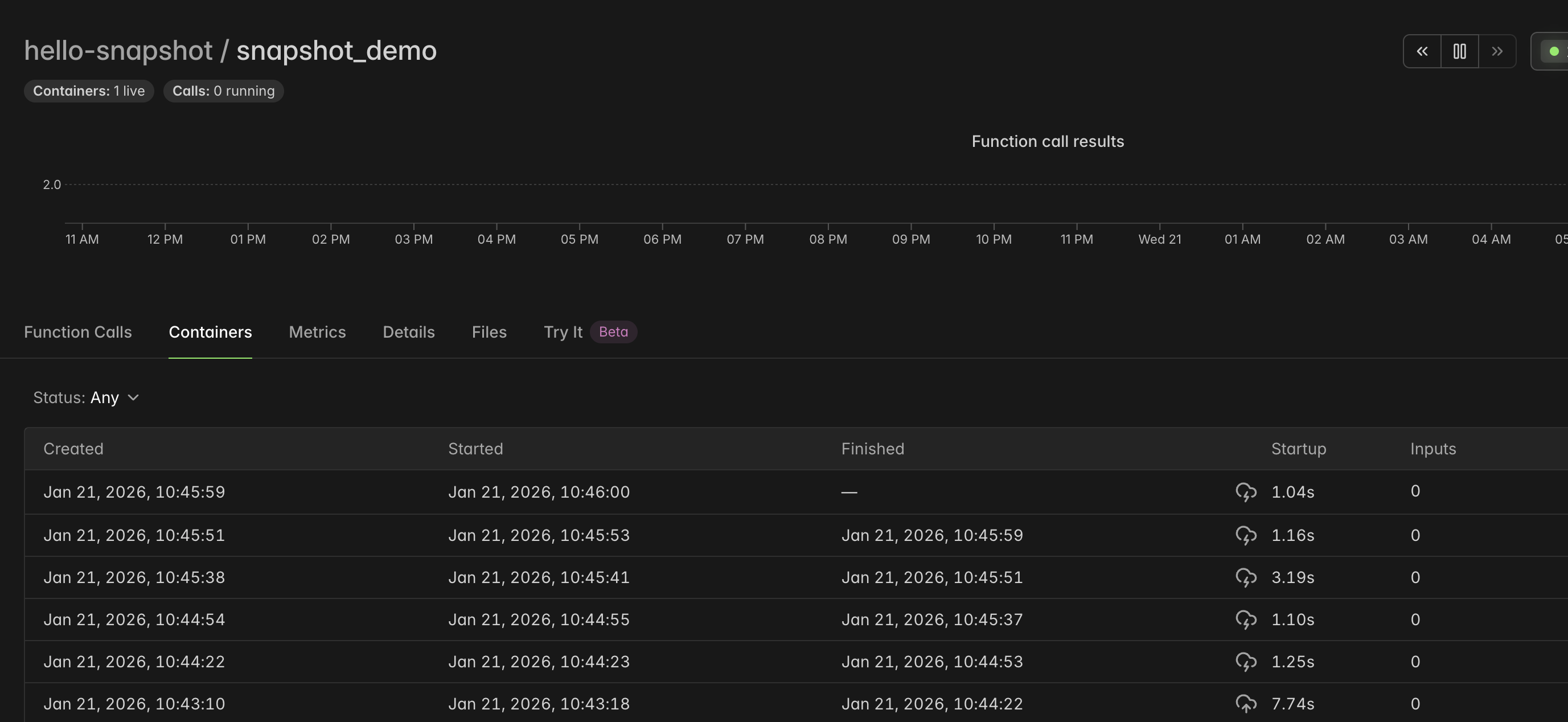
You can also search your Modal App’s logs for the line Snapshot created. Restoring Function from memory snapshot.
When are Memory Snapshots updated?
Redeploying your Function with new configuration (e.g. a new GPU type) or new code will cause previous Memory Snapshots to become obsolete. Subsequent invocations to the new Function version will automatically create new Memory Snapshots with the new configuration and code.
Changes to Modal Volumes do not cause Memory Snapshots to update. Deleting files in a Volume used during restore will cause restore failures.
I haven’t changed my Function. Why do I still see Memory Snapshots being created sometimes?
Modal recaptures Memory Snapshots to keep up with the platform’s latest runtime and security changes.
Additionally, you may observe your Function being snapshot multiple times during its first few invocations. This happens because Memory Snapshots are specific to the underlying worker type that created them (e.g. CPU flags), and Modal Functions run across a handful of worker types.
Snapshot creation may add some latency to Function initialization.
- CPU-only Functions need around 6 snapshots for full coverage.
- GPU Functions need 2-3 snapshots per GPU type.
How do Memory Snapshots handle randomness?
If your application depends on uniqueness of state, you must evaluate your Function code and verify that it is resilient to snapshotting operations. For example, if a variable is randomly initialized and that value included in a Memory Snapshot, that variable will be identical after every restore, possibly breaking uniqueness expectations of later code.
Advanced usage of Memory Snapshots
Using GPUs without using GPU Memory Snapshots
CPU Memory Snapshots on their own block GPU access,
but GPU Functions can still benefit from Memory Snapshots.
This involves refactoring your initialization code to run across two separate @modal.enter functions:
one that runs before creating the snapshot (snap=True),
and one that runs after restoring from the snapshot (snap=False).
For instance, you might load model weights into CPU memory in the snap=True method,
then move the weights onto GPU memory in the snap=False method.
Even without GPU snapshotting, this technique reduces the startup time for Embedder.run in the below example by about 3x, from ~6 seconds down to just ~2 seconds.
import modal

image = modal.Image.debian_slim().uv_pip_install("sentence-transformers")
app = modal.App("sentence-transformers", image=image)

with image.imports():
    from sentence_transformers import SentenceTransformer

model_vol = modal.Volume.from_name("sentence-transformers-models", create_if_missing=True)


@app.cls(gpu="a10", volumes={"/models": model_vol}, enable_memory_snapshot=True)
class Embedder:
    model_id = "BAAI/bge-small-en-v1.5"

    @modal.enter(snap=True)
    def load(self):
        # Create a memory snapshot with the model loaded in CPU memory.
        self.model = SentenceTransformer(f"/models/{self.model_id}", device="cpu")

    @modal.enter(snap=False)
    def setup(self):
        self.model.to("cuda")  # Move the model to the GPU!

    @modal.method()
    def run(self, sentences:list[str]):
        embeddings = self.model.encode(sentences, normalize_embeddings=True)
        print(embeddings)


@app.local_entrypoint()
def main():
    Embedder().run.remote(sentences=["what is the meaning of life?"])


if __name__ == "__main__":
    cls = modal.Cls.from_name("sentence-transformers", "Embedder")
    cls().run.remote(sentences=["what is the meaning of life?"])
GPUs are not available in CPU-only Memory Snapshots
If you are using the GPU Memory Snapshot feature (enable_gpu_snapshot), then
GPUs are available within @modal.enter(snap=True).
If you are using memory snapshots without enable_gpu_snapshot, then it’s important
to note that GPUs will not be available within the @modal.enter(snap=True) method.
image = modal.Image.debian_slim().uv_pip_install("torch", "numpy")


@app.cls(enable_memory_snapshot=True, gpu="a10", image=image)
class GPUAvailability:
    @modal.enter(snap=True)
    def no_gpus_available_during_snapshots(self):
        import torch
        print(f"GPUs available: {torch.cuda.is_available()}")  # False

    @modal.enter(snap=False)
    def gpus_available_following_restore(self):
        import torch
        print(f"GPUs available: {torch.cuda.is_available()}")  # True

    @modal.method()
    def demo(self):
        print(f"GPUs available: {torch.cuda.is_available()}") # True
Watch out for accidental GPU initialization during CPU-only Memory Snapshots
The torch.cuda module has multiple functions which, if called during
snapshotting, will initialize CUDA as having zero GPU devices. Such functions
include torch.cuda.is_available and torch.cuda.get_device_capability.
If you’re using a framework that calls these methods during its import phase,
it may not be compatible with memory snapshots. The problem can manifest as
confusing “cuda not available” or “no CUDA-capable device is detected” errors.
We have found that importing PyTorch twice solves the problem in some cases:
@app.cls(enable_memory_snapshot=True, gpu="A10")
class GPUAvailability:
    @modal.enter(snap=True)
    def pre_snap(self):
        import torch
        ...
    @modal.enter(snap=False)
    def post_snap(self):
        import torch   # re-import to re-init GPU availability state
        ...
In particular, xformers is known to call torch.cuda.get_device_capability on
import, so if it is imported during snapshotting it can unhelpfully initialize
CUDA with zero GPUs. The workaround for this
is to set the XFORMERS_ENABLE_TRITON environment variable to 1 in your modal.Image.
image = modal.Image.debian_slim().pip_install("xformers>=0.28")  # for instance
image = image.env({"XFORMERS_ENABLE_TRITON": "1"})